50 images of the same character in one night, on my own hardware
If you want many images of one and the same character (for example a company mascot, the hero of a campaign or a character from your product illustrations), one good image is only the beginning, because then you need more images that still show the same character, with the same face, in the same outfit and in the same style, only in a different pose and a different situation. I checked how much of this work can be done on my own hardware: from one image that I chose as the reference (a badger in a yellow cardigan), 50 more images of the same character were made in a single night and passed an automatic quality check. The AI models that came up with the scenes, drew the images and rated them ran in my home, and the process itself sent no image to an outside provider. I didn't pay for a single request either (the hardware and the electricity are a separate cost), but with a local model rating the images the whole job goes much more slowly than with a model in the cloud (in the first such run about 8.7 minutes per accepted image, compared with about 2.4 minutes with Claude). The final say in choosing still belongs to a person: in the morning I kept 35 of those 50 images.
Keeping one character looking the same across many images is a known problem, by the way: in August 2025 Google, introducing its Gemini 2.5 Flash Image model, called it a fundamental challenge in image generation and admitted that it was still working on even more reliable character consistency. For a set of different images it is enough that each one keeps to a shared style, but here every new image has to match the first one. The whole process I built, which I call the character factory, rests on checking that match. Several characters have gone through it in turn: a pigeon and a cat with a cloud model, a crow with both that model and a local one, and a goat, a raccoon and a badger with the local one only.
How an AI character factory works
Before the factory starts working on its own, there is one decision I kept for myself: an image generation model draws a few character proposals from descriptions written by a language model, the same language model rates the finished images, and I choose from among them the reference on which every next image is based. From that moment everything happens without me: the language model gets the reference and the character description (who the character is, what it looks like and in what style it is drawn), comes up with further scenes, that is, poses, activities, facial expressions, props and outfits, and an image editing model draws each of them from the reference.
Next, the language model compares each image with the reference, first as a whole and then close up (the face, the hands, the outlines and whether the character can be cut out cleanly), and the image is either accepted, or sent back for a fix with a differently worded instruction, or dropped after three failed attempts. At the end a program cuts the accepted character out of the plain pink background it was drawn on and moves it onto a cream one.
The key parts here are three open AI models that you can download and run yourself. I use two for the images, because the reference is made from scratch, from a description alone, while every next version is a redrawing of the finished reference: the reference is made by Z-Image-Turbo (from Alibaba Group), which creates an image from a text description, and the next versions by FLUX 3 Image Klein (from Black Forest Labs), which reworks an existing image according to an instruction (in my case, the reference). The scenes are invented and the images rated by GLM 5.3 Flash (from Z.ai), a language model that also takes images and answers questions about them in text.
Generating AI characters in the cloud
In the first versions of the factory the work was done by Claude Opus 5.5, Anthropic's AI model, which I used through the API, that is, paying for each request according to the vendor's price list: it came up with the scenes and rated the images, while the drawing was already done by Klein on my hardware. Run this way, the night with the cat produced 100 accepted images in 4 hours for $13.40, which is about 13 cents and 2.4 minutes per image. For a hundred images that is not much, in my opinion, but with this kind of rating each image (like the reference) goes to an outside provider, because Claude has to see it to rate it.
Generating AI images locally, on your own hardware
Later, with the same instructions and the same rating rules, I replaced Claude with GLM 5.3 Flash, which runs at home on two connected computers (the image models are on a third). In a small test I gave GLM six ratings from the night with the cat to redo, ones where I knew what Claude had decided (it had accepted two images, sent two back for a fix and rejected two), and the local model made the same decision for the same reason six times out of six, but that is only six ratings, so I treat the result as a hint, not as proof.
What is slower is not the drawing (in both versions Klein does it on my hardware, in about 40 seconds per image) but the rating: in the first run with GLM (with the crow) it took about 8.7 minutes per accepted image, compared with about 2.4 minutes with Claude, and on the night with the badger the ratings alone took GLM about seven hours in total.
One thing stayed the same: neither of the two models varies its scores much, because with Claude and with GLM alike roughly four in five decisions to accept an image were made at a score of 8 out of 10, so the scores alone make it hard to tell which of the accepted images are the best.
The first character made entirely with local AI models
The goat and the raccoon went through the factory on local models alone, but I still chose their references from proposals that Claude had come up with and rated. The badger was the first to be made entirely at home, from the first image to the last: GLM described four proposals, Z-Image-Turbo drew them, GLM rated the finished images (writing and rating took it 152 seconds in total), and I chose the second of the four (the one GLM gave 10 out of 10), in which the badger is offering a cookie. The night itself ran from 18:16 to 5:04, and in that time the factory accepted 50 images (36 of them on the first try) and rejected 12 scenes after repeated failed attempts.
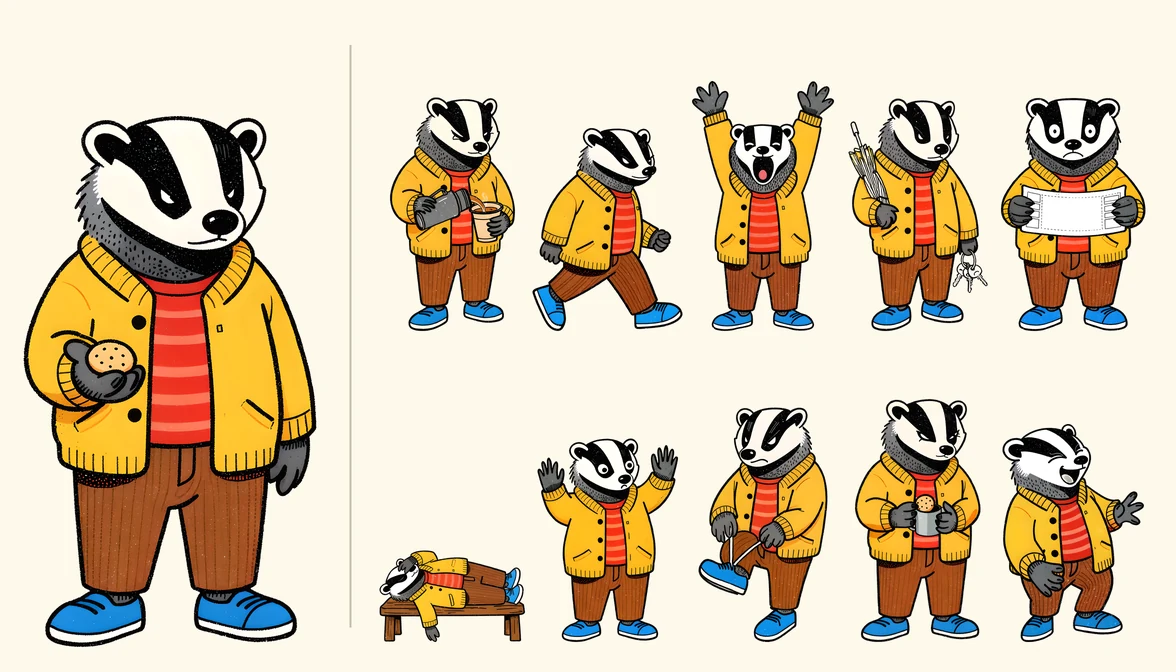
On the left, the reference; on the right, ten of the 35 images I kept after the night with the badger.
When the character description does not match the reference
On the chosen reference the goat was holding a kettlebell, and GLM wrote it into all 25 scene ideas (hanging from a horn, tied to a pull-up bar, cuddled like a kitten), so that run was stopped after eight accepted images. I had chosen that reference for the character, not for the kettlebell, and since then the character description says what on the reference is only a prop, so in the repeated run (50 images in 8 hours) the kettlebell appeared in just two scenes, the ones that were about it (swings and presses).
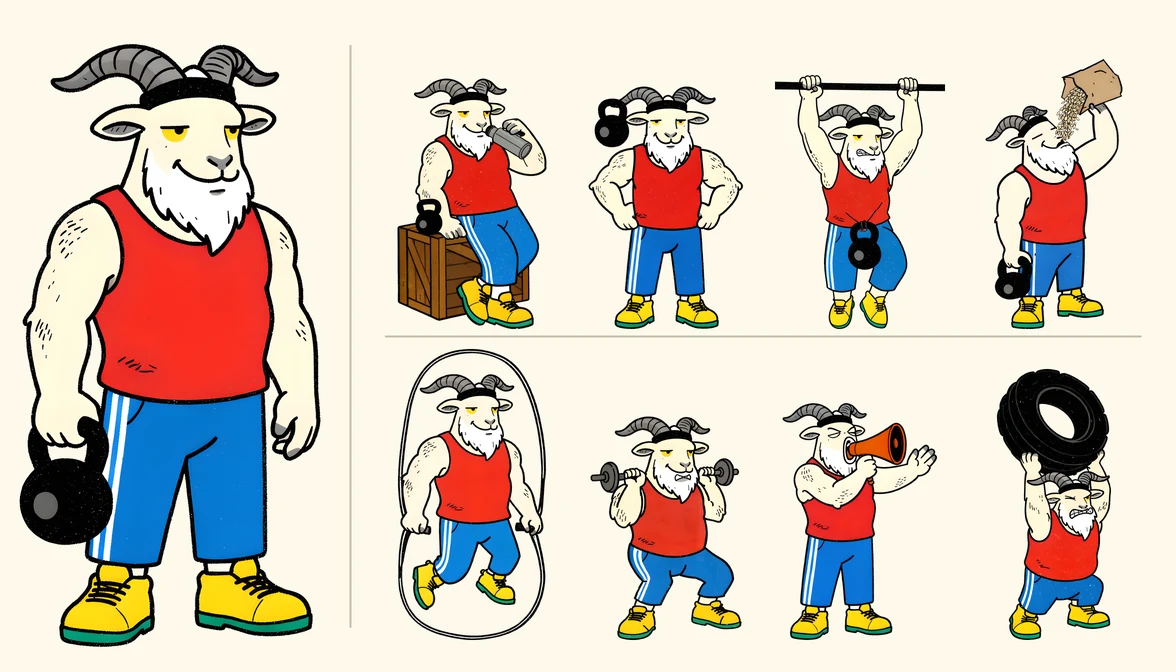
On the left, the goat's reference; at the top, images from the first run (the kettlebell is in every one); at the bottom, images from the repeated run, in which the character description already said that the kettlebell is only a prop.
With the badger the mistake was less obvious: the character description, rewritten after the reference was chosen, described the eyes as “small narrowed black eyes”, whereas on the reference they are white, narrowed slits with black pupils, set in black stripes. GLM judged them by the description, not by the image: it faulted the eyes in 27 of 56 rejections (in 12 of them it called them “inverted”), and 7 of the 12 rejected scenes were dropped precisely because of them. Yet on roughly 23 of those 27 faces the eyes look the same as on the reference, and on other images the model let exactly the same eyes through (the description has since been corrected).
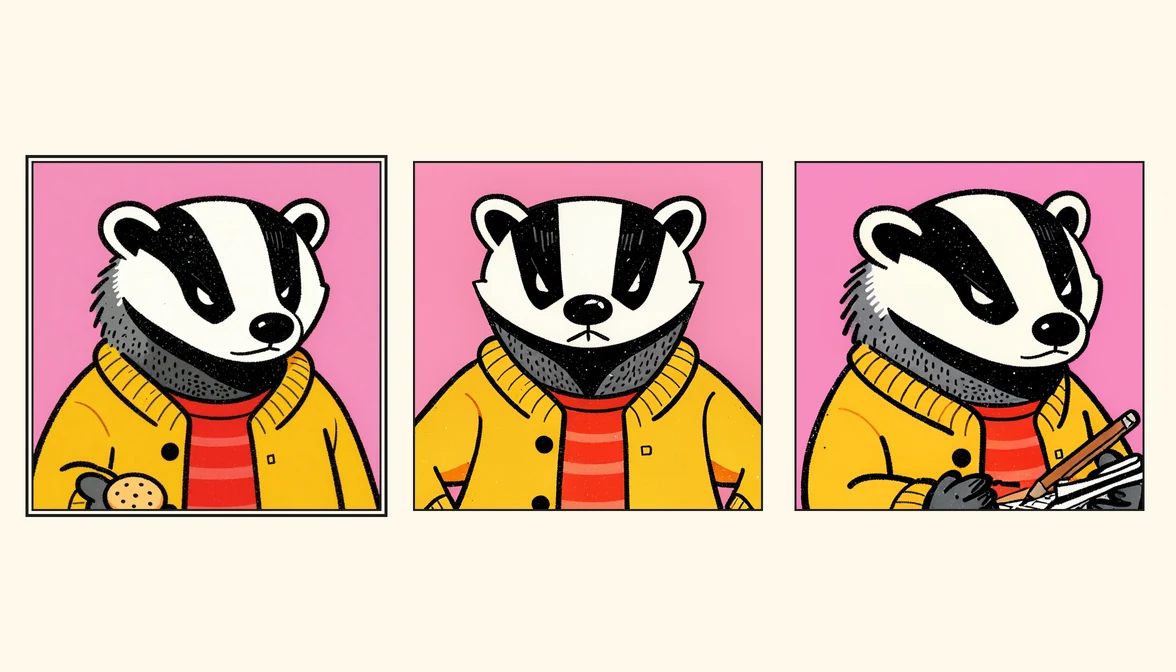
From the left, the reference (framed) and two faces the model rejected because of the eyes, although the eyes on them are the same as on the reference.
The same model also caught real mistakes (a white outline around the whole character, as on a sticker, ten times, and among other things garbled lettering on the lottery ticket and a fly swatter that no paw was holding), but I learned that automatic rating needs a character description that matches the reference, or else it rejects good images. It seems to me that in a company it works similarly when a person checks the work, too: if the mascot's description says something other than what can be seen on the approved drawing, the person checking each new image may reject good ones.
Choosing the images is still up to a person
There are two points in the whole process where I am the one who decides: choosing the reference at the start, and reviewing the finished images, after which 52 of the 100 images were left from the night with the cat, and 35 of 50 from each of the nights with the raccoon and the badger. I also checked whether a small, fast AI model could do this review for me, but on the images Claude had accepted on the night with the cat (some of which I kept and some of which I deleted), two such models, run locally, told my picks from my rejections no better than random guessing. To me this is a good example of how the work is divided here: an AI model is quite good at catching images with mistakes and can do it all night, whereas which of the correct images I want to show depends on taste and on what I need them for, and that part I keep for myself.
When it pays to make an AI mascot on your own hardware
I assume that a process like this is most useful where a brand has its own character and needs it in many different situations (in posts, in ads or on packaging): the next images are then made overnight, unsupervised, and in the morning all that is left is to review them. I would do it locally when the character or the data should not leave the company, and in the cloud when time matters.
According to the makers, an ordinary consumer graphics card is enough for the drawing alone (Z-Image-Turbo is said to fit in 16 GB of graphics card memory, and the lighter version of Klein to run on NVIDIA GeForce RTX cards with 8 GB), whereas the language model that rates the images is much larger: GLM 5.3 Flash has 320 billion parameters (the numbers a model is made of), and it is the one that takes up two of my computers. One caveat concerns Klein: it is released under a license its maker named the “FLUX Kommunity License” (yes, with a K), and under it only people and companies that, together with their affiliates, have less than $5 million in annual revenue may use the images commercially for free. Larger companies can buy a license from the maker to run the model themselves, or use it through the maker's API. The license does not, however, settle explicitly whether a larger client may then use images made by a smaller company commercially, so in that situation I would ask a lawyer.
I realize that local image models probably won't match the best paid ones (GPT Image or Midjourney, for example), but just as with text generation, you don't always need the best model and a good enough one is often sufficient, while in many cases what matters more than the model itself is whether the whole process can be automated and repeated so that the images have the same style and similar quality every time.
In short
- From one image of a badger, chosen as the reference, 50 more images of the same character were made in a single night and passed an automatic quality check, and all the AI models involved ran in my home, with no per-request fees.
- The local GLM 5.3 Flash made the same decisions as Claude in a small test of six ratings, but the whole job goes much more slowly with it: in the first run with GLM it took about 8.7 minutes per accepted image, compared with about 2.4 minutes with Claude.
- The model that rates the images also goes by the character description, so the description has to match the reference: with the badger the description of the eyes differed from the drawing, and because of that the model rejected images in which the eyes looked the same as on the reference.
- Choosing the reference and the review after the night are still up to a person: of the 50 accepted badger images I kept 35, and the two small AI models I tested on such a review told my picks from my rejections no better than random guessing.
- In my opinion, generating images of one character overnight pays off most for a company that needs a lot of material with one recurring character, locally when the character or the data should not leave the company, and in the cloud when time matters.
Sources
- GLM-5.3-Flash (model card) (opens in a new tab), Z.ai (zai-org) on Hugging Face
- GLM-5.3-Flash/FlashX - Overview (opens in a new tab), Z.ai (developer docs)
- Tongyi-MAI/Z-Image-Turbo (model card) (opens in a new tab), Tongyi-MAI on Hugging Face
- Z-Image - Efficient Image Generation with Single-Stream Diffusion (project page) (opens in a new tab), Z-Image Team, Tongyi MAI, Alibaba Group
- black-forest-labs/flux-3-image-klein (model card) (opens in a new tab), Black Forest Labs on Hugging Face
- FLUX Kommunity License v.1.0 (LICENSE.md in the model repo) (opens in a new tab), Black Forest Labs Inc. on Hugging Face
- FLUX 3 Image Klein: open weights, 5.6B parameters (opens in a new tab), Black Forest Labs (blog)
- Pricing (opens in a new tab), Anthropic (Claude Platform docs)
- Introducing Gemini 2.5 Flash Image, our state-of-the-art image model (opens in a new tab), Google Developers Blog